Scheduling by hand is a reality. Some say “yes, but my trade is a bit special”, while others seek to automate (and therefore make reliable) their organisation.
Automating and digitising also saves time and avoids operator fatigue. In some cases, scheduling managers plan production with Excel spreadsheets of more than 10,000 rows. Nobody can manage that without sooner or later making mistakes that will, at best, cause delays and, at worst, quality problems. Add to this the human risk of a key person being absent (the scheduling manager, for example) and the risk that nobody can take over, even partly.
The solution for your scheduling:
To improve and optimise your production capacity, you decide to implement scheduling software for finer planning of your MOs (Manufacturing Orders).
There are 3 categories of solution to meet this need:
- Planning in your ERP software through a dedicated module
- APS software (Advanced Planning and Scheduling)
- MES software, through its scheduling module
No category is “better” than the others. The right solution will depend on your company’s context and, of course, on how well the company supporting you masters the tool it deploys for you.

Be aware that there is specific software for almost every trade. However, you must watch out for one thing: some software is “adapted” to certain trades, while other software is “dedicated” to certain trades. If, for example, you work in aluminium, the KmExtrusion solution will be a better fit. If you run multiple productions or multiple materials, or produce small batches, a tool such as KmProd will be better suited, because it is adapted to this type of production.
Use your MES to manage your scheduling:
Scheduling built into the MES draws on information that differs from one company to another:
- Machine stoppages captured by the MES
- Available resources: machines, materials, people (schedules, availability, and also operators’ skills and authorisations)
- Information on the various MOs and sub-MOs
- Work in progress
- And also the variables specific to your trade, which we can adapt.
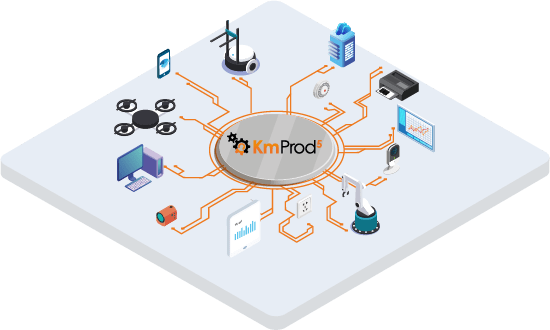
The MES can then provide connected scheduling, in real time and on a variety of devices (laptop, mobile, tablet). The results are displayed as a Gantt chart.
Thanks to this information, and in particular real-time tracking, the MES is the only category of solution able to process production data automatically in real time, because it communicates with the sensors installed on the machines as well as with the ERP.
Go further with KmProd scheduling:

Through its KmProd MES, Meta 2i offers scheduling that can take into account all the constraints of your trade. Our software adapts to your industrial process, so you can plan your production according to your needs without us having to develop too many specific modules. This greatly limits your costs while allowing faster deployment.
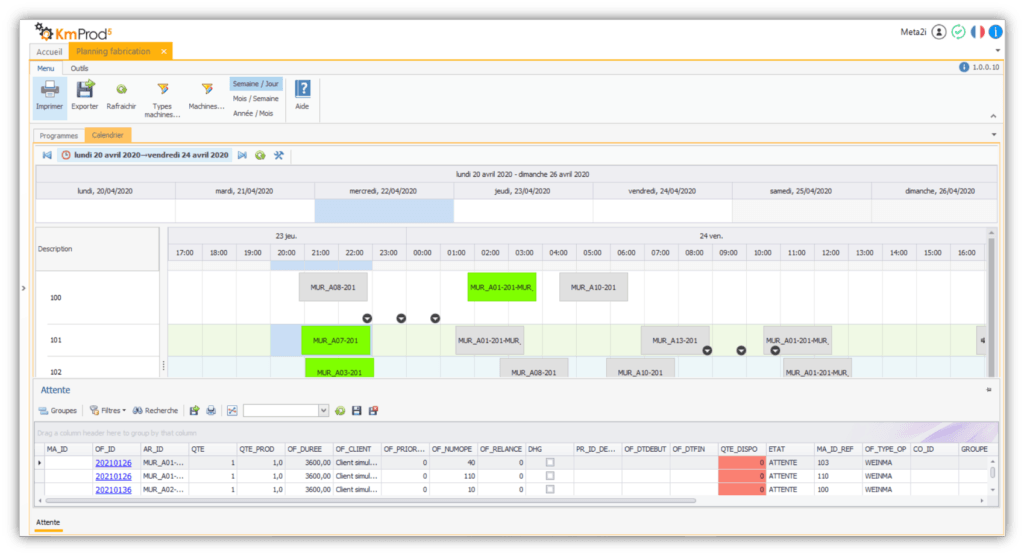
KmProd stands out from its competitors through its flexibility! Adaptable up to 50%, KmProd can be implemented whatever your business sector. Don’t hesitate to book a meeting with us to tell us about the challenge you want to take on!